.png.8e1932637cddb5545967a863af3a105e.png)



About This File
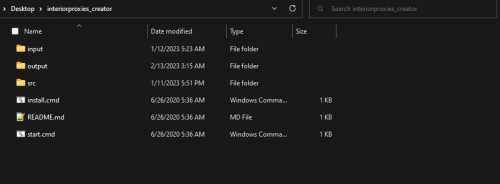
INSTRUCTIONS FOR INSTALL AND EXECUTION OF THE PROGRAM/ SOFTWARE:
Very Easy Steps:
- Install Node JS.
- Export To Your Preferred Location (Recommended : Desktop/Documents Folder).
- run "install.cmd" (After Installing NodeJS).
- Place the YMaps & MLOS Into The Input Folder.
- Create a recourse folder for you "Interiorproxies.meta" located in the "Output" Folder.
- Insert your "fxmanifest.lua" Into the created recourse folder.
- Add the name of your new recourse folder to your server.cfg
- Restart Your Server.
Test out your maps you should be able to see that the player will no longer disappear as much inside of interiors.
HAVE FUN!!!
A COPY OF THE "FXMANIFEST.LUA" WILL BE ATTACHED TO THE DOCUMENT.
ENJOY!
Video Coming SOON!!!
Edited by JayOf Pens
Missing NodeJS Files

![More information about "Debadged Vehicle Pack | 450 CARS - DigitalLativa [9GB!]"](https://launcherleaks.net/uploads/monthly_2024_08/debadged-vehicle-pack-450-cars-645028.thumb.webp.f1cd01e8175a89bcf9c68fe426456f44.webp)
.thumb.webp.9efc2f23bddff94214c45f99e747f9bf.webp)

Recommended Comments
Create an account or sign in to comment
You need to be a member in order to leave a comment
Create an account
Sign up for a new account in our community. It's easy!
Register a new accountSign in
Already have an account? Sign in here.
Sign In Now