.png.8e1932637cddb5545967a863af3a105e.png)






Aqua30410
-
Posts
4 -
Joined
-
Last visited
Content Type
Profiles
Downloads
Release Notes
Store
Files posted by Aqua30410
-
Free
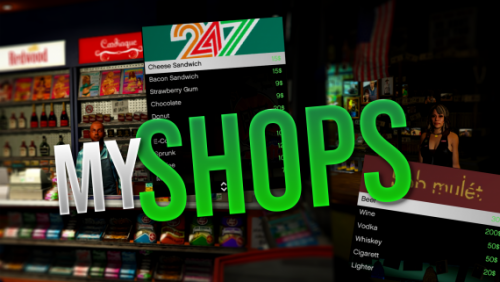
myScripts myShops
Hey guys,
with this script I want to present my enhanced shops script.
Features:
- You can sell items and weapons in one shop. This also allows you to create an ammunation with this script. Or different ones, with different content.
- You can set up different Peds for every shop you add to the Config. And those are also performance-optimized, so they unload when you are far away.
- You can toggle the possibility to sell items to a shop in the Config.
- You can add as many shops as you want and
-> toggle the blip for each shop individually
-> set up individual shop content
-> select a ped for this shop
-> and choose a banner (like the 24/7 banner)
- You can set up everything in the Config: Also a Translation file with english and german translations is included.
Showcase:
https://youtu.be/X3omGnpm2qc
Dependencies:
- ESX
- NativeUI
526 downloads
(0 reviews)0 comments
Submitted
-

Free
myScripts myCardealer
Further information: https://forum.cfx.re/t/mycardealer-a-cardealer-script-with-showrooms-order-management-test-drives-and-much-more/2367739
Hey guys,
and welcome to myCardealer. With this script I want to present my solution for a cool roleplay cardealer.
Features:
- You can set up to four vehicle showrooms to exhibit the vehicles, which are for sale.
- The player can open a menu at each showroom and can have a look at the configurable vehicles
-> Performance
-> Maximum speed
-> Speedup 0-100
-> Amount of modifications
-> Fuel capacity
- As a cardealer you are also able to change the color of the vehicle and to spawn it for a test-drive
- The cardealer can't sell an infinite amount of vehicles. Before a vehicle can be sold, it have to be ordered. More information below.
- All normal job features are included like a Wardrobe, a Boss menu, and of course a Ring to get the cardealers attention, when he isn't at the shop.
- Of course you can add every vehicle you want to the shop!
How to order a new vehicle?
- First of all you have to go to the Computer at the cardealer and select the vehicle you want to sell
- Then press "Manufacture this vehicle". This will take a certain amount of time (configured in the database).
- When this time is over, your vehicle is ready for the delivery to your shop.
- After pressing the "Bring car to the dealership" button your vehicle will arrive at 6 pm at your cardealer.
- Now you are able to sell this vehicle!
- You can always check the current state at the computer
Showcase:
https://youtu.be/GkTWctoEGEA
Dependencies:
- ESX
- NativeUI
814 downloads
-

Free
myScripts myHud
The Hud now supports SaltyChat native. So when you use SaltyChat, there is no need to change anything!
myHud is a player hud, which includes a display of
Money Voice-range Health Hunger Thrist Alcohol In the Config.lua file you can simply disable / enable the health, voice-range and money to adapt the HUD as easily as possible to your beliefs.
In Addition there are explanations given to simply edit the colors and progress bar thickness of your HUD!
Regarding the voice-range:
Because there are tons of different ways for your voice chat, you have to add a simple event to your voice chat, when the voice-range is changed. The event is called: TriggerEvent("myHUD:updateVoiceRange", progress). -> Instead of progress add your voice-range there.
If you don't want to use the voice-range feature in general, just disable this in the Config.lua.
Dependencies:
esx_status (You have to add an event to your esx_status -> completely explained in the readme.txt) esx_basicneeds
Showcase: https://youtu.be/P-Te_J-StcE299 downloads
(0 reviews)0 comments
Submitted
-
Free
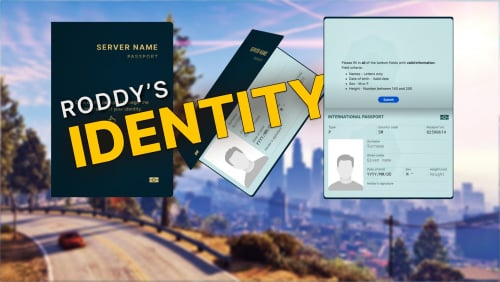
Roddys Identity for ESX Legacy
https://forum.cfx.re/t/updated-roddys-identity-3d-animated-passport-discontinued-esx-paid/4657435
About
Cause a great first impression for new players in your server with this beautiful and interactive identity script, which consists of a passport that flips open like a book in 3D where players can enter and submit their character’s information.
The interface is completely responsive and the passport will scale according to the player’s resolution and aspect ratio, so it will look right on any screen.
This resource uses esx_identity as a base, which means that you can simply replace it, if you’re already using it in your server.
The dependencies are also exactly the same as esx_identity (and you can already find all of them preinstalled if you picked the Plume ESX or the ZAP Hosting ESX template when setting up your server with txAdmin).
1553 downloads