.png.8e1932637cddb5545967a863af3a105e.png)





Greeni
-
Posts
1 -
Joined
-
Last visited
Content Type
Profiles
Downloads
Release Notes
Store
Files posted by Greeni
-
Free
OkOK Billing
By Greeni in Server Dumps
Package Description
[Preview]
Preview Link
[Explanation]
This is a complete billing system with a beautiful and user-friendly interface.
[How it works]
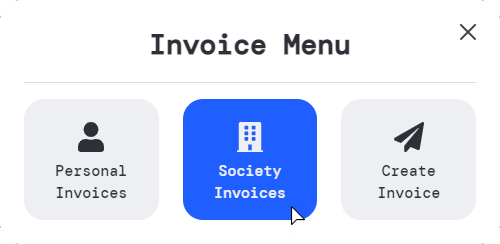
When you type '/invoices' a menu pops up, allowing you to see your invoices, your society invoices and send a invoice to a player.
In the config file you are able to set:
The command that allows players to open the billing menu; The VAT % of the invoices (visual only, it won't influence the final invoice value); If you want to have a deadline for players to pay their invoices; How many days players have to pay their invoices if the deadline option is set to true; Whether you want the system to automatically pay the invoices after the deadline expires; If you want there to be a daily fee after each day a invoice isn't paid; The daily fee percentage; If only the boss will be able to see the society invoices; The societies that can send invoices to players.
It includes Discord logs such as:
When a invoice in sent to a player; When someone pays/cancels a invoice; When a invoice is automatically paid by the system.
Additional informations:
The notes field (when you're sending a invoice to a player) is not mandatory. If you don't write anything it will write by itself "Nothing to add"; The invoice is always sent to the nearest player; On the "My Invoices" section, the unpaid invoices will always appear on the top of the list; When a player pays a invoice or it is automatically paid by the system, the money is instantly added to the society account; The script verifies the offline players when the automatic payment event is executed.
It comes with a complete tutorial on how to use it.
Notifications are not included.
[Config]
COMMANDS & FUNCTIONALITY
Config.InvoicesCommand = 'invoices' -- Command used to open the invoices menu Config.VATPercentage = 23 -- Visual only, it won't influence the final invoice value, change it to your country VAT value Config.LimitDate = true -- Used to enable/disable whether we want to have the payment limit date or not Config.LimitDateDays = 10 -- If Config.LimitDate is enabled, it is used to define the days of the deadline for payment after issuing the invoice Config.PayAutomaticallyAfterLimit = true -- It serves to enable/disable if we want the invoice to be automatically paid after the due date Config.FeeAfterEachDay = true -- Serves to enable/disable if we want unpaid invoices to increase in value after each day they are not paid (For this to work you need to set = true and add a number to LimitDateDays) Config.FeeAfterEachDayPercentage = 5 -- If Config.FeeAfterEachDay is enabled, it is used to set the fee percentage after each day Config.OnlyBossCanAccessSocietyInvoices = true -- Defines if only the boss can access the society invoices, if false all the employees will have access to it Config.AllowedSocieties = { -- Allowed societies to open the 'Society Invoices' and 'Create Invoice' menus 'police', 'ambulance' } DISCORD LOGS
-- To set your Discord Webhook URL go to server.lua, line 5 Config.BotName = 'ServerName' -- Write the desired bot name Config.ServerName = 'ServerName' -- Write your server's name Config.IconURL = '' -- Insert your desired image link Config.DateFormat = '%d/%m/%Y [%X]' -- To change the date format check this website - https://www.lua.org/pil/22.1.html -- To change a webhook color you need to set the decimal value of a color, you can use this website to do that - https://www.mathsisfun.com/hexadecimal-decimal-colors.html45518a Config.CreateNewInvoiceWebhookColor = '16127' Config.PayInvoiceWebhookColor = '65352' Config.AutopayInvoiceWebhookColor = '4542858' Config.CancelInvoiceWebhookColor = '9868950'
Idle: 0.00-0.01ms Paying an invoice: 0.05ms Cancelling an invoice: 0.05ms Creating a new invoice: 0.05ms Autopay/fees check: 0.00-0.01ms
No IP lock Easy install3925 downloads