.png.8e1932637cddb5545967a863af3a105e.png)






About This File
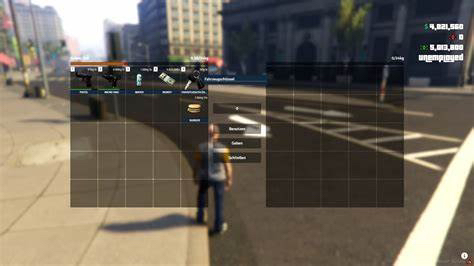
This file contains a fully pre-configured version of Ox Inventory. It replaces old, text-based inventory menus with a modern, drag-and-drop grid system.
What is Ox Inventory?
Ox Inventory is a visual, slot-based inventory system. Instead of navigating text menus to use or drop items, players use a graphical user interface (UI) to move and manage their items with a mouse.
Key Features
- Metadata Support: Items can hold unique data. For example, two identical medical oximeters can have different serial numbers or owners.
- Item Durability: Items and weapons degrade over time and can break or expire based on usage.
- Weapons as Items: Weapons are stored physically in slots. You drag ammunition onto the weapon to load it and drag attachments directly onto the gun.
- Vehicle Trunks & Gloveboxes: Opening a vehicle storage splits the screen, allowing you to drag items directly between your pockets and the car.
- Hotkey Bar: Players can bind items like food, weapons, or an oximeter to keys 1–5 for quick access.
How it Works
When a player opens the inventory (default:
TAB), the system processes actions in three stages:
- Client UI: The visual interface opens instantly. The script is highly optimized, running with very low latency (~5ms resource monitor time) to prevent lag.
-
Server-Side Validation: Every time an item is moved, the server verifies weights, slot availability, and database logs (
oxmysql). This prevents duplication bugs and cheating. - Framework Bridge: A built-in bridge translates Ox Inventory actions into server commands. For example, when you use an oximeter, the bridge triggers the medical script to read the target player's health data.
Status
This resource is Ready-to-Go. Standard items, weights, and configurations are pre-defined.

![More information about "[DLS / Non-ELS] 2025 CHP Dodge Durango Pack By Lildunkboi Modding"](https://launcherleaks.net/uploads/monthly_2026_10/Screenshot_2026-09-29_18-47-16.thumb.png.0127236d6ec258d14896988dcfeda7da.png)



![More information about "[DEV] vest parts, nylon belt parts, and radios"](https://launcherleaks.net/uploads/monthly_2026_06/im.thumb.png.608a69e520e28505fe93119351d1d4d4.png)
![More information about "[FIXED] ONX PD AND EMS VEHICLE PACK"](https://launcherleaks.net/uploads/monthly_2025_08/onx.thumb.png.8c2abbbfab7a859c3780e84748ab6635.png)








.thumb.png.8dbb6fae4fda0ea4c6c5939d900b3d47.png)


