.png.8e1932637cddb5545967a863af3a105e.png)






About This File
Install
AIRRIDE v1.0.0
1. Put the included "airride" folder in your FiveM resources folder.
2. Add: ensure airride
3. Restart the server/resource.
4. Enter a supported vehicle as driver.
5. Press F11 or type /airride.
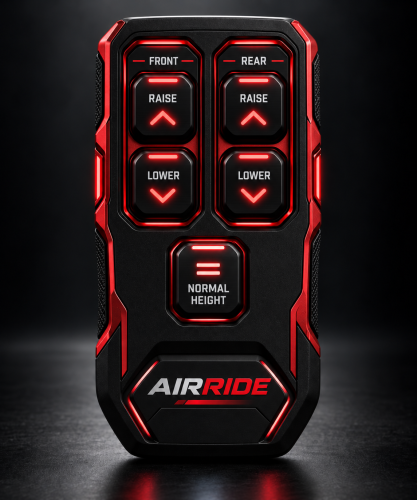
6. Hold FRONT/REAR RAISE or LOWER to adjust.
7. Press NORMAL HEIGHT to restore normal suspension/camber.
Edit airride/config.lua for limits, keybind, camber, persistence, excluded classes, and per-vehicle overrides.
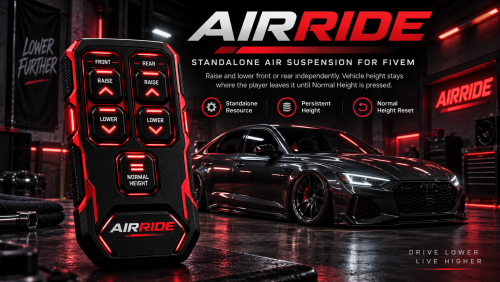
AIRRIDE is a standalone FiveM air-suspension resource with a premium red/black remote NUI. Players can raise or lower the front and rear stance, keep the selected height until Normal Height is pressed, and get subtle dynamic negative camber while lowered. Includes network sync, JSON persistence, configurable vehicle limits, add-on vehicle support, and no framework/database dependency.
What's New in Version 1.1.3 See changelog
Released
AIRRIDE v1.1.3 — Standalone FiveM Air Suspension
Adjust your vehicle’s stance with a detailed red-and-black remote, smooth height controls, and progressive negative camber. No framework or database required.
Features:
-
Draggable remote with saved screen positioning.
-
Stronger camber as you lower: up to 6° front and 5° rear by default.
-
Saved vehicle settings and multiplayer synchronization.
-
Normal Height button to restore suspension.
-
Configurable height and camber limits.
This update removes the artificial speed-based body tilt associated with the front-end dip during acceleration.
Press F11 or type /airride while in the driver seat to open the remote.
Front/rear inputs combine into overall ride height; camber adjusts separately for each axle. Results vary with the vehicle model.
Installation and update instructions are included.


![More information about "[DLS / Non-ELS] 2025 CHP Dodge Durango Pack By Lildunkboi Modding"](https://launcherleaks.net/uploads/monthly_2026_10/Screenshot_2026-09-29_18-47-16.thumb.png.0127236d6ec258d14896988dcfeda7da.png)



![More information about "[DEV] vest parts, nylon belt parts, and radios"](https://launcherleaks.net/uploads/monthly_2026_06/im.thumb.png.608a69e520e28505fe93119351d1d4d4.png)
![More information about "[FIXED] ONX PD AND EMS VEHICLE PACK"](https://launcherleaks.net/uploads/monthly_2025_08/onx.thumb.png.8c2abbbfab7a859c3780e84748ab6635.png)








.thumb.png.8dbb6fae4fda0ea4c6c5939d900b3d47.png)


